Built by a solo freelancer · Used daily · No auto-bid, no burner accounts

Stop Wasting Connects.
Apply Smarter.

UpJobPilot scores every Upwork job, flags risky clients — low pay, no hires, unverified payment — and drafts a tailored proposal, right as you browse. You decide which jobs are worth your connects.

14-day free trial · no credit card, then $18 $9/mo or $180 $90/yr (launch pricing for first 500).

Free AI option supported: bring a Gemini key (free tier, no card) — many users pay $0 for AI.

See Demo

This intro video is AI-generated narration. The screenshots and dashboard footage are real, recorded from the live app.

Powered by Claude, Gemini, or ChatGPT
AI score + proposal in seconds
No manual job hunting

Set up once. Apply smarter forever.

Set up in ~5 minutes. The browser helper scores jobs on any Upwork page with no API key. Want automatic background scanning too? Connecting Upwork's API is optional (1–3 day approval — start that early if you want it).

01

Optional: Upwork API (for auto-scan)

Want UpJobPilot to scan in the background and alert you to high-fit jobs? Apply for free Upwork API credentials (optional — the browser helper scores jobs without it). Approval takes 1–3 days, so start early if you want auto-scan. Step-by-step guide — 5 min read →

02

Download & Activate

Download UpJobPilot, run the launcher, and enter your license key. The setup wizard walks you through everything in under 5 minutes.

Download
03

Connect & Configure

Link your Upwork account via OAuth, set your keywords and budget filters. Your credentials never leave your machine.

04

Apply to the Right Jobs

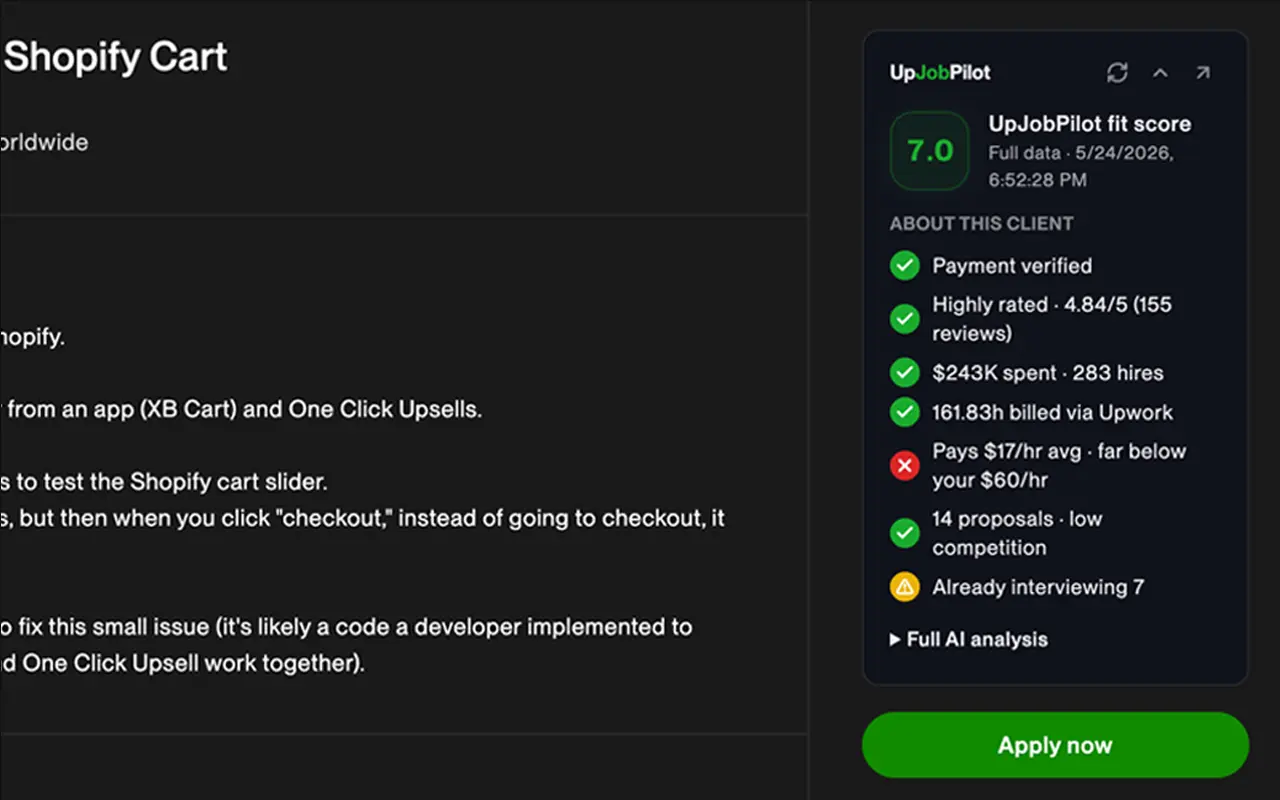
Get an instant fit score, client analysis (pay, hire rate, red flags), and a ready-to-send proposal for every job — so your connects go to the ones actually worth it.

Everything you need
to land more jobs

Built for serious Upwork freelancers who want every competitive advantage.

AI Job Scoring

Every listing gets a 1–10 score based on budget, client history, and fit for your specific profile.

Proposal Drafts

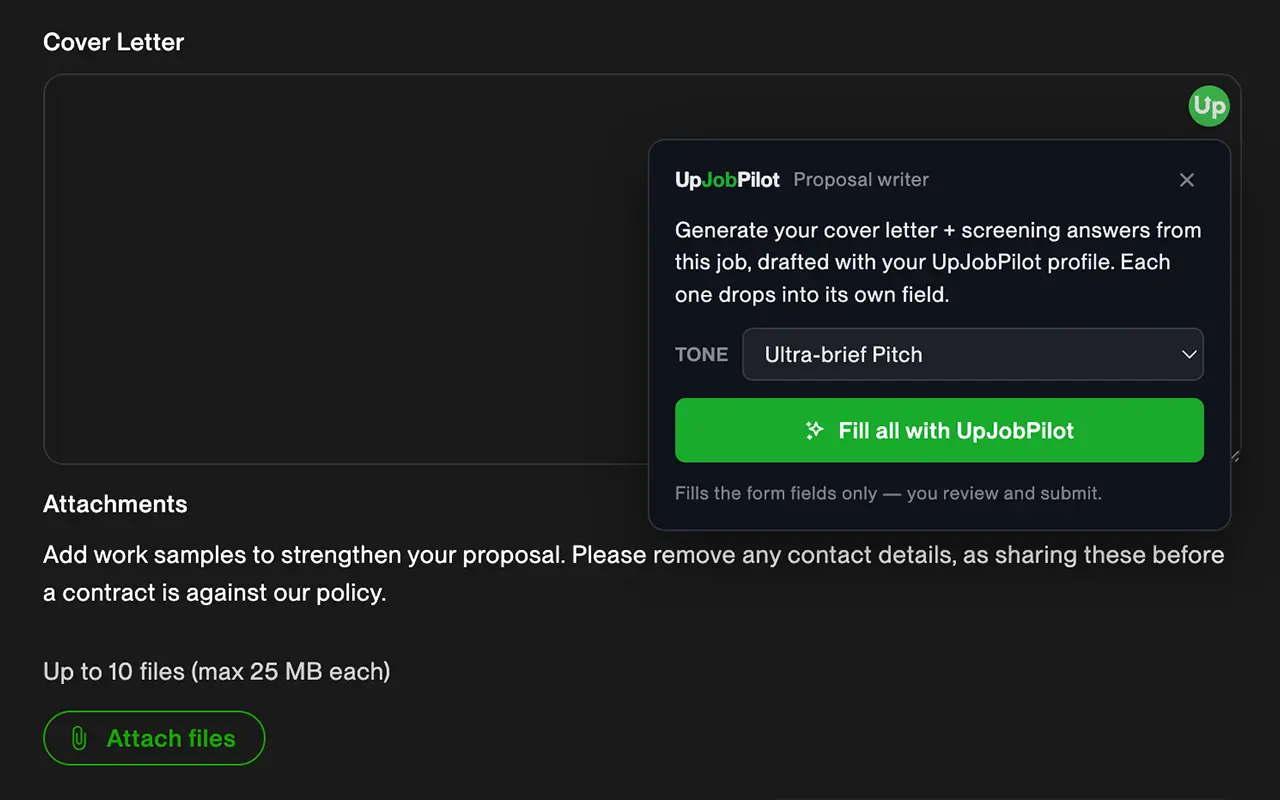
Ready-to-send proposals written in your tone, referencing your experience and the client's needs.

Client Intelligence

See total spending, hire rate, payment verification, and last activity before you write a single word.

Real-time Alerts

Browser notifications the moment a high-scoring job appears. Never miss a great opportunity.

Budget Filters

Set minimum fixed price and hourly rate. Never waste time on jobs that don't meet your threshold.

Local-First Architecture

Your Upwork tokens stay on your machine — never on our servers. With BYOK, job data goes directly from your machine to your own AI provider. We never see it.

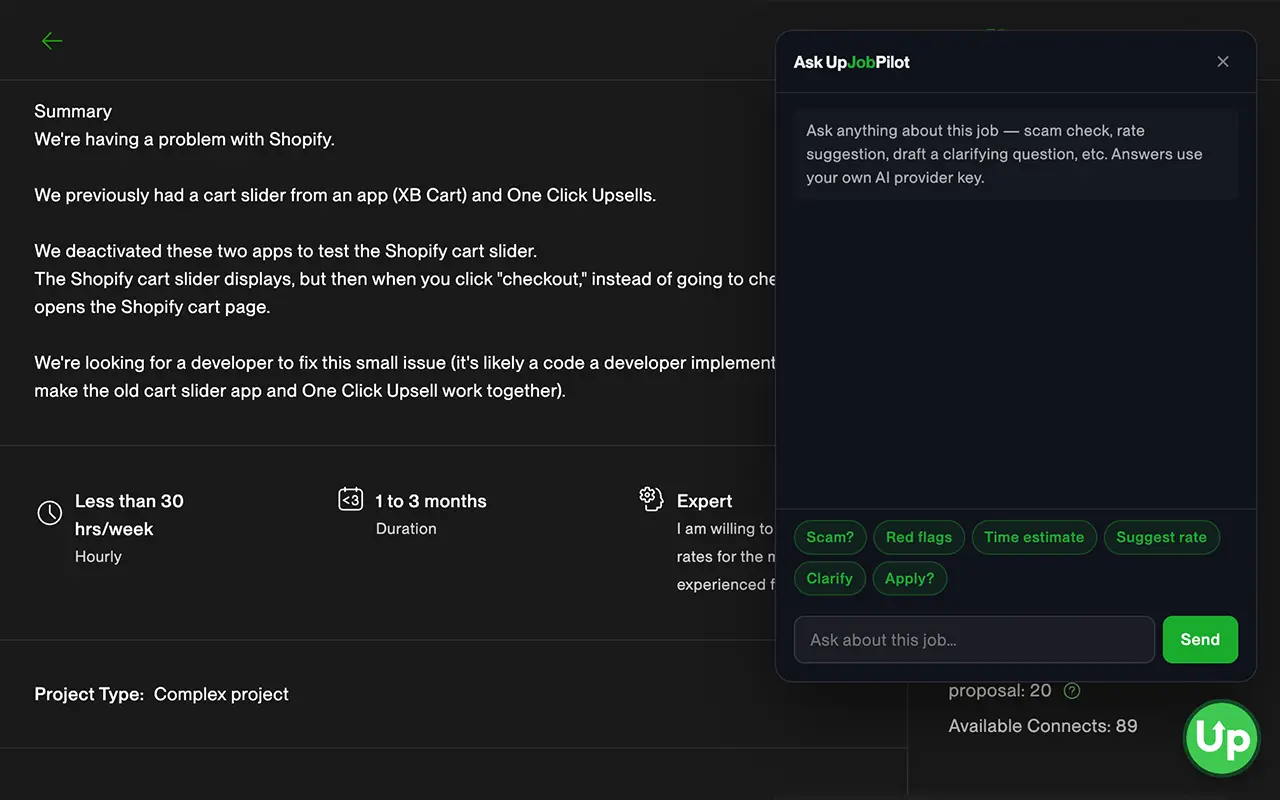
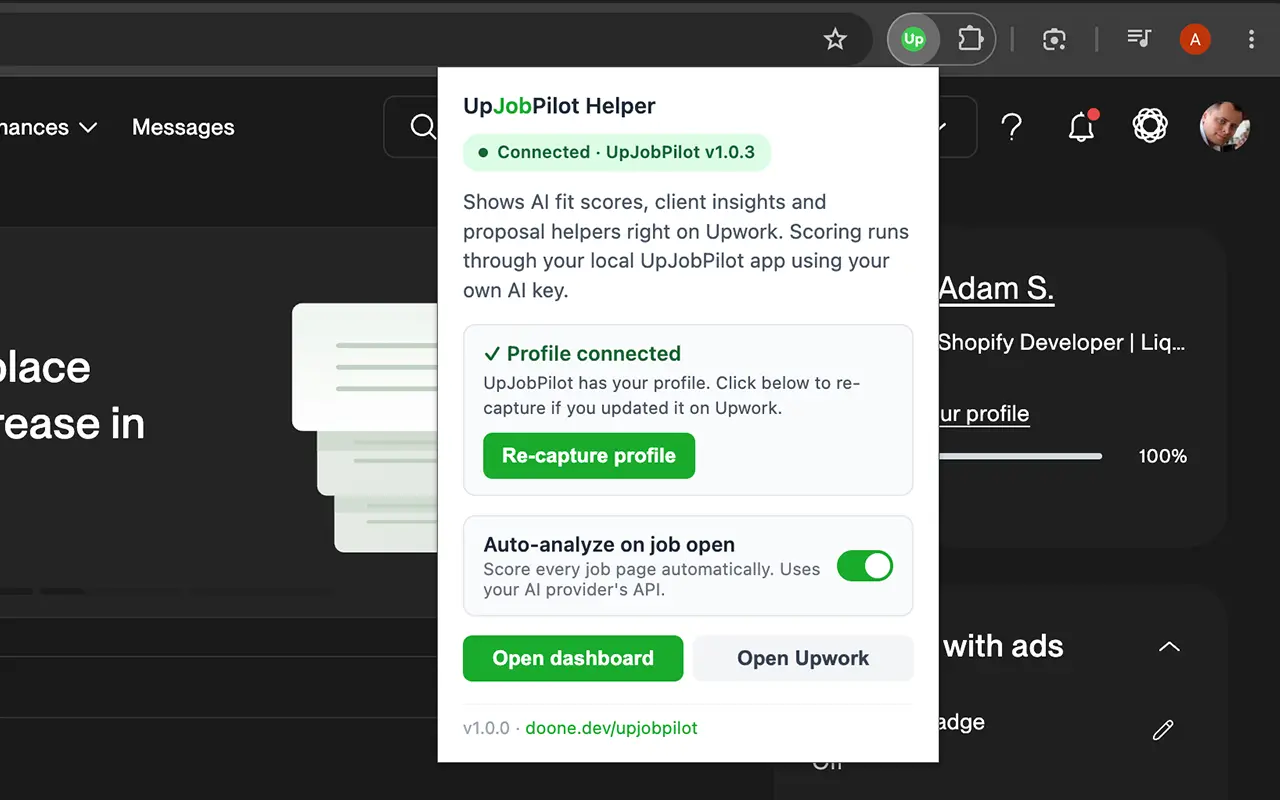
Your AI co-pilot, right on the page

Install the free browser helper and UpJobPilot works as you browse Upwork — scoring, client insights and proposal help appear on the page itself. No Upwork API key needed.

Click any screenshot to zoom in.

Is your Upwork profile costing you jobs?

AI analyzes your title, overview, skills, rate, and portfolio — then tells you exactly what to fix. Personalized, specific, actionable.

See a real example report →
Profile score & verdict
Section-by-section breakdown (Strong / Needs Work / Critical)
Title & overview rewrite Paid plan
Rate strategy Paid plan
Skills optimization Paid plan
Competitive edge analysis Paid plan
5-step action plan Paid plan
7.5/10
First Impressions — Strong
Title Analysis — Needs Work
Overview / Bio — Needs Work
Skills & Keywords — Strong
Rate Strategy — Critical
Competitive Edge — Needs Work

Honest comparison vs other Upwork tools

I'm a solo freelancer who built this for myself. I'm not in this to scale to 100K agencies — I'm in this because I needed it and you might too. Here's how UpJobPilot stacks up.

UpJobPilot
$9/mo
Upwex
$4.99–24.49/mo (tiered)
UpHunt
$27–89/mo
Vollna
$24–640/mo
AI requests / month Unlimited (BYOK) 50–450 cap Tiered 3,000 credits
AI billing You pay AI provider directly Marked up in tier price Marked up in tier price Marked up in tier price
Auto-bidding (Upwork ToS risk) No · drafts only No · drafts only Yes Yes
Upwork account required Your existing account, OAuth "Burner" account, 2FA off* Cloud automation Cloud automation
Where job data lives Your machine only Browser extension reads pages Their cloud Their cloud
AI profile audit (built-in) Separate tool Separate tool
Built for Solo freelancers Solo + agency Agency-leaning Both, scale agency

* Quoted from Upwex's setup docs. Pricing and features as of May 2026, from each vendor's public pages — verify before buying. Spotted something off? [email protected].

No hidden AI margin

BYOK means you pay your AI provider directly. Pennies per analysis. Competitors mark up AI in their tier pricing — we don't.

No request limits

Other tools cap you at 50–600 AI requests per month. We don't cap anything because we're not paying for your AI.

You stay in control

No burner accounts, no disabled 2FA, no auto-bidding. UpJobPilot never applies or messages on your behalf — you review and submit everything yourself. Runs entirely on your machine; your data never touches our servers.

Local-first, by design

Desktop app on your Mac or Windows machine. Your job data, proposals, and AI prompts never touch our servers. Cloud-hosted competitors can't say that.

Built by one freelancer, for one freelancer

I use UpJobPilot every day. It exists because I needed it. No VC, no growth team, no agencies in mind. If something breaks or feels wrong, you reply to my email and you get me directly.

Profile audit included

AI rewrite suggestions for your title, overview, skills, and rate strategy. Other tools either don't have this or charge extra. Ours is in every plan.

One simple price. Cancel anytime.

Bring your own AI provider key. No request limits. No hidden margin. 14-day free trial, no credit card, then $9/mo (launch pricing).

Launch pricing — first 500 subscribers get 50% off ($9/mo or $90/yr). Price locked for life.
476 spots left

Monthly Annual SAVE $18
Free Trial
14-day Trial Full app, full features, 14 days unlimited. No credit card. You bring your own AI provider key from day 1. Use Gemini free tier and pay $0 for AI; or use Anthropic / OpenAI (paid). Decide later if you want to subscribe.
$0
14 days · no card required
  • Unlimited AI analyses for 14 days
  • Full app, all features unlocked
  • Free AI option (Gemini)
  • No credit card, no auto-charge

Best value
BYOK MonthlyBYOK Annual Bring your own Anthropic / Google / OpenAI API key. AI calls go directly from your machine to your provider — your job data never crosses my servers. No request limits, no markup. Cancel anytime.
$18 $180 $9
per month · cancel anytimeper year · 2 months free vs monthly
  • Unlimited AI analyses
  • Free AI option supported (Gemini)
  • Or pay provider directly (~$0.001–$0.005/job)
  • AI scoring, proposals, refine, profile audit
  • Launch price locked for life

Popular Upwork jobs collect 50+ proposals within hours. Being in the first 10 isn't luck — it's a workflow. UpJobPilot is that workflow.

"But how much will the AI cost me?"

Almost nothing — and you can't get a surprise bill. Move the slider to your real usage and see for yourself.

30
900 analyses per month
Your AI cost with Gemini
$0/month
Paid directly to your provider — and it's prepaid, so this is the most it can ever be.
UpJobPilot
$9/mo + $0 AI
No markup. No cap. AI billed by your provider, not us.
Typical competitor
$27–89/mo
AI cost is baked into their price + their margin — and capped at 50–600 analyses/month.

Why you can't overspend: Anthropic & OpenAI are prepaid — load $5 and $5 is the hard ceiling, full stop. Gemini even has a free tier in most countries.* Every cent is itemized in your provider's own dashboard. With other Upwork tools you pay the same AI cost anyway — just hidden inside their fee, plus their markup. Here you pay the AI cost at cost.

* Gemini's free tier is available in 200+ countries with no credit card. In the EEA, UK & Switzerland, Google requires a paid Gemini key (per Google's API terms) — or use ChatGPT / Claude, still pennies.
Estimates use each provider's published API rates as of May 2026 and a typical analysis (~3,500 in / ~900 out tokens); your real cost varies with job length. Spotted a rate that changed? Tell us: [email protected].

Frequently Asked Questions

What is UpJobPilot?

UpJobPilot is an AI assistant for Upwork freelancers. It scores every job for fit, analyzes client quality (pay, hire rate, payment verification, red flags), and drafts a tailored proposal — as you browse Upwork, or via optional background scanning. You review and submit everything yourself, so you stop wasting connects on bad-fit jobs.

How does UpJobPilot work?

You install a lightweight app on your Mac or Windows PC plus a browser helper extension. As you browse Upwork, the helper scores each job you open and shows client insights right on the page — no Upwork API key needed. Optionally, connect Upwork's API to also scan for jobs on a schedule in the background and get alerts. AI scoring runs from your machine using your own AI key; results appear in a local dashboard with filters, sorting, and notifications.

Is UpJobPilot safe to use with my Upwork account?

UpJobPilot is designed to keep you in control. It runs entirely on your own machine — no cloud storage of your Upwork data, nothing on our servers. It never sends proposals, bids, or messages automatically; you review and submit everything yourself. There's no burner account, no disabling 2FA, no auto-bidding. Connecting Upwork's official API (with your own credentials, for optional background scanning) is the only part that touches Upwork's systems, and it's entirely optional.

Does UpJobPilot send proposals automatically?

No. UpJobPilot generates proposal drafts that you review, edit, and submit yourself through Upwork. You stay in full control of every proposal you send.

What does the AI score mean?

Each job gets a score from 1 to 10 based on budget, client history, job requirements, and how well it matches your freelancer profile. Jobs scoring 7+ trigger instant browser notifications so you never miss a great opportunity.

How much does UpJobPilot cost?

14-day free trial, fully unlimited, no credit card required. After trial: $9/month BYOK (launch pricing for the first 500 subscribers — regular price will be $18/mo). $90/year option also available (saves $18 vs monthly). Cancel anytime.

BYOK means you bring your own API key. Google Gemini offers a free tier (no credit card needed) in 200+ countries — most users pay $0 for AI. (Per Google's API terms, users in the EEA, UK & Switzerland must use a paid key.) On a paid key, AI cost is typically $0.001–$0.008 per analysis — ChatGPT ~$0.001, Gemini ~$0.003, Claude ~$0.008 — paid directly to the provider.

Can I really use UpJobPilot without paying anything for AI?

Yes — Google Gemini has a free tier: just sign in with Google, no credit card. It comes with a daily allowance set by Google (typically enough for a few dozen to a few hundred analyses a day — your exact limit shows in Google AI Studio and can change over time). Heavy users can switch to a paid key for pennies. Two caveats: (1) the free tier is run by Google, not UpJobPilot — the limits and terms can change without notice; (2) per Google's API terms, users in the EEA, UK & Switzerland must use a paid key.

What happens after the 14-day trial?

Trial ends, app prompts you to subscribe ($9/mo). If you don't subscribe, the app stops generating new analyses but keeps all your past data accessible — you can sort, filter, and re-read anything you analyzed during the trial. Subscribe anytime later and pick up where you left off. No auto-charge — we don't have your credit card, you decide when to pay.

How can it be $9/mo when competitors charge $27–89?

BYOK economics + launch pricing. You pay your AI provider directly (free tier available) so I don't need to mark up AI in tier pricing. Other Upwork tools bake AI costs into their plans — that's why they charge $27–89/mo with usage caps (50–600 requests/month). With UpJobPilot you bring your own key and use it as much as you want. The $9/mo covers the app, updates, and infrastructure — that's it. Note: $9 is the launch price for the first 500 subscribers; regular price will be $18/mo. Once you subscribe at $9, you're locked at $9 for life (grandfather pricing).

What's the launch pricing all about?

The first 500 subscribers get $9/mo (or $90/yr) locked in for life. Regular price after that is $18/mo. This isn't a temporary sale — once you subscribe at $9 with the launch code, your subscription stays at $9 even after the launch period ends, as long as you don't cancel. I'm pricing aggressively early to validate the product fast and reward early supporters. The discount code is auto-applied when you click "Subscribe" on this page.

Why "BYOK"? What does it actually mean for me?

BYOK = Bring Your Own Key. You create a free Anthropic, Google, or OpenAI API account (5 minutes), paste the key into UpJobPilot once, and the app calls the AI directly from your machine using your key. You pay your AI provider directly — typically pennies per analysis. We don't pay for your AI, so we don't cap your usage. Other Upwork tools mark up AI in their tier pricing (50–600 request caps); we don't.

Which AI provider should I pick — Claude, ChatGPT, or Gemini?

Short answer: Claude for highest quality, ChatGPT for best value, Gemini for lowest cost. You can switch any time in Settings → AI Provider; your saved keys stay separate per provider.

Longer version, based on real testing on Upwork jobs:

  • Claude (Anthropic) — deepest analysis. Catches economic mismatches (a job that's "WordPress" but priced for junior support when you're a senior dev), notices soft signals like "growth path to Head of X" wording, gives the most actionable Pass/Apply recommendations. ~$0.008 per analysis (still pennies). Best for users who want the highest-quality scoring and don't mind a tiny extra cost.
  • ChatGPT (OpenAI, GPT-4o mini) — solid analysis at ~8× lower cost than Claude (~$0.001 per analysis — the cheapest option). Reaches the same Pass/Apply conclusion as Claude on most jobs, just with less depth. Recommended for most users — best balance of quality and cost.
  • Gemini (Google, 2.5 Flash) — the only one with a free tier (no card, in most countries), or ~$0.003 per analysis on a paid key. In my testing it tends to over-score borderline jobs (gives 6/10 where Claude/ChatGPT give 4/10), so you might apply to more bad-fit jobs and burn connects. Pick it for the free tier, or if you're already good at filtering bad-fit jobs yourself.

Honest take: the AI cost difference between providers is small ($0.001 vs $0.008 = $7/month for 1,000 analyses) compared to the cost of a wasted Upwork connect ($0.15 per connect, 16 connects per proposal ≈ $2.40). One avoided bad-fit application pays for months of Claude.

Is this safe to use with my main Upwork account?

UpJobPilot is built to keep you in control and run entirely on your own machine — nothing on our servers. It never auto-bids, never sends proposals or messages for you, and never asks you to create a "burner" Upwork account or disable 2FA. You review and submit every proposal yourself. Some other Upwork automation tools recommend creating a separate Upwork account just for their bot — that's a direct violation of Upwork's "one account per person" Terms of Service. We don't do any of that. Optional background scanning uses Upwork's official Developer API with your own credentials (you register your own free Developer App and OAuth your existing account); the browser helper works without any API key. As with any third-party tool, you're responsible for using it in line with Upwork's Terms.

Who's behind UpJobPilot?

It's me — Adam, a solo freelancer based in Poland. I built UpJobPilot because I was tired of refreshing Upwork forty times a day and burning connects on jobs I had no business applying to. I use it every day. There's no VC, no growth team, no support outsourcing. If something breaks, you reply to your purchase email and you get me directly. The trade-off: I'm one person, so big feature requests take longer than at a venture-funded competitor. The upside: I'm not optimizing for shareholders, and the product gets better because I'm dogfooding it daily.

Do I need technical skills to use UpJobPilot?

No. Download, double-click to launch, install the browser helper, and follow the setup wizard. You'll need Node.js installed (free, one click) and an AI provider key (Gemini's free tier needs no card in most countries). Creating Upwork API credentials is optional — only needed if you want automatic background scanning; we provide a step-by-step guide.

What makes UpJobPilot different from other Upwork tools?

UpJobPilot combines job monitoring, AI scoring, client analysis, and proposal writing in one tool. It runs locally for privacy, uses your own Upwork credentials, and the AI writes proposals tailored to your specific skills and experience — not generic templates.
Honest reads, no marketing fluff

Honest review · 7 min read

Who UpJobPilot is for (and who shouldn't bother)

An honest review from the guy who built it. How UpJobPilot saves Upwork connects, why timing on a fresh job post matters more than proposal quality, and who should skip this tool entirely.

Read the post →

Get UpJobPilot

Available for Mac and Windows. License key required to activate.

Free to download. License key required to activate.

macOS 12+ Windows 10+ Node.js 18+ Runs locally on your machine

Profile Audit

7.5/10

Strong technical foundation and stellar track record undermined by unfocused positioning, portfolio bloat, and underpricing that signals junior-level rates despite 20+ years of experience.

This analysis is AI-generated and may contain inaccuracies. Use it as a starting point, not definitive advice.

Want the full audit with rewrites and action plan? Available on the $9/mo plan. Free tier gets the score and verdicts — try it first.

See Pricing →

What you'll need

UpJobPilot runs on your own computer. You'll need Node.js (free, one-click install) and your own AI provider key — Google Gemini's free tier needs no credit card in most countries. The browser helper extension scores jobs on Upwork with no API key.

Optional: for automatic background scanning, you can connect Upwork's free API (1–3 day approval). Not required to get started — the browser helper works without it.